
The hero/avatar image on the home page can show different images with different themes. You might need it if your image is only suitable for light theme, and you want to use different image for dark theme.
Hugo Configuration File
First enable your avatar in the Hugo config. I will use hugo-theme-stack as a reference point.
InfoCheck your themes docs to know what’s the proper config for your avatar/hero image, and put that in your Hugo configuration file.
In case of hugo.yaml:
params:
    sidebar:
        emoji: 🇵🇰
        subtitle: "Plug In. Geek Out."
        avatar: "img/avatar-dark.webp"
For hugo.toml:
[params.sidebar]
emoji = 🇵🇰
subtitle = "Plug In. Geek Out."
avatar = "img/avatar-dark.webp"
Put your avatar for Hugo config in the /assets/img directory. Here I set the one which I want to use if something breaks in my custom.scss rules and this will act as a fallback image.
Custom SCSS Rules
InfoThese custom rules might not work for your Hugo theme, due to theme key mismatch. The
hugo-theme-stackusesdata-schemekey for tracking theme changes. Other Hugo themes might use different keys for this.
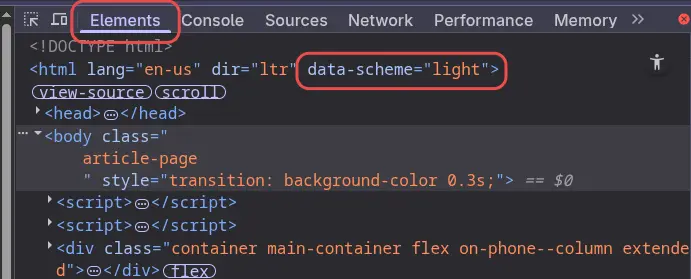
Now let’s move towards creating some custom rules to use different images for light and dark themes.
Let’s create an avatar directory:
mkdir static/avatar #Run this inside your main hugo directory
Copy your avatar-light.webp and avatar-dark.webp files inside the avatar/ directory.
The.webpimage format is more suitable for websites, due to its small size and better delivery optimizations. See ImageMagick guide for conversion.
Let’s create another directory for SCSS rules:
mkdir assets/scss/
Inside scss/ create a custom.scss file. Add following lines to this file:
|
|
Now you’re good to go. You will see different hero/avatar images for light/dark themes.